



- Room 1807, Unit 9, Building 2, Shangxing Commercial Street, Shangde Road, Shangxing Community, Xinqiao Subdistrict, Bao'an District, Shenzhen City, China
CONTACT US

WhatsApp


Contact Us
Our team is on stand by, waiting toassist you.

Videos
A large collection of educational videos and tutorials.

About Us
Learn about our company, leadership, and mission totransform manufacturing.

Privacy Policy
Applies to all personal information collected through and/or processed in connection.


Aerospace & UAV
WJ Prototypes is your 3D manufacturing partner from prototype to large scale production.

Consumer Electronics
New Product Introduction Solutions for Consumer Electronics.

Robotics & Automation
Need some assistance bringing your robotic device or parts from the sketch-board to reality?

Medical Devices
The medical industry needs high quality, dependable and safe parts and products.

Automotive
New Product Introduction Solutions for Automotive

Industrial Machinery
The main purpose of industrial prototyping is to take the product from drawings into the real world.


The most reliable fixes are uniform wall thickness, correctly tuned pack and hold pressure, targeted cooling at thick sections, and, when needed, a resin or tooling change. No single lever solves every case. Sink marks almost always come from a combination of geometry and process, so the fastest path to a clean surface is pairing a CAD review with process trials rather than chasing one variable in isolation. The sections below break out design rules, machine settings, material and tooling options, and a troubleshooting sequence you can run on the press.
TL;DR:
- Most sink marks result from non-uniform wall thickness, early gate freezing, or cooling channel deficiencies, which are best addressed through design adjustments.
- CAD modeling should accurately reflect actual rib and boss thicknesses, and simulation tools like Moldflow help identify sink-prone geometries early.
- Process improvements, such as optimizing pack and hold pressure, gate timing, and temperature settings, can reduce sink marks without tooling modifications.
- Material selections, including using less shrink-prone resins or filled grades, and advanced cooling techniques like conformal channels, significantly impact sink formation.
- Validating fixes through short-run injection molding trials on prototype tools is crucial before investing in permanent production molds.
Sink marks are shallow depressions on the surface of a molded part, and they form because thick sections cool slower than the thin walls around them. As the outer skin freezes first, the still-molten core keeps shrinking, and that shrinkage pulls the surface inward before it has a chance to solidify flat. Industry testing has traced this directly to differential cooling between thick and thin regions.
You’ll see sinks show up in predictable places:
A part can pass every functional test and still ship with a visible sink, because the defect is cosmetic and dimensional rather than structural. That’s exactly why it gets flagged in QA even when the part works fine.
Before touching the tool, run through the usual suspects in order of likelihood.
Most sink problems trace back to one or two of these, not all four at once. Isolating which one applies before adjusting settings saves a lot of trial shots.
Design fixes are the cheapest and most permanent way to prevent sink marks, because they remove the root cause instead of compensating for it downstream.
Keep wall thickness as close to uniform as the part’s function allows, and core out solid sections wherever geometry permits. For ribs and bosses, industry guidance calls for keeping rib thickness at roughly 40% to 60% of the adjoining wall, sometimes called the 60/40 rule for rib design. Adding a moat or relief channel around a boss also helps by giving the thick section somewhere to shrink without dragging the visible face down with it.
A few more design moves worth building into the CAD model early:
Running the design through simulation before cutting steel catches most of this. Autodesk Moldflow is standard practice for flagging sink-prone geometry ahead of tooling, and it’s especially valuable when changing part geometry later would be expensive.
Pro Tip: *Model your ribs and bosses at their actual nominal thickness in CAD, not a rounded-up “safe” number.
If the design is sound and sink marks are still showing up, the fix usually lives in the process window.
None of these adjustments require new tooling, which makes them the logical second step after a design review. Get the pack profile and gate timing right and a surprising number of “material problem” sink marks disappear entirely.
Resin family changes how much a part shrinks and how forgiving it is of process variation. Amorphous resins like ABS and polycarbonate shrink less and more predictably than semi-crystalline resins like polypropylene and nylon, which go through a sharper volumetric change as they crystallize. That difference alone explains why the same wall thickness sinks badly in one material and barely at all in another.
Filled and reinforced grades, glass or mineral filled versions of common resins, reduce shrinkage further and are worth considering when a part geometry can’t be redesigned around the problem. Reviewing shrinkage behavior across available injection molding materials before finalizing a design saves a redesign cycle later.
On the tooling side:
When design and process changes don’t fully clear a sink, a few specialized techniques are worth the added tooling cost.
Run this sequence before committing to any tooling change.
Pro Tip: Change one variable per trial shot. Stacking two changes at once (say, hold time and mold temperature together) makes it impossible to tell which one actually fixed the sink.
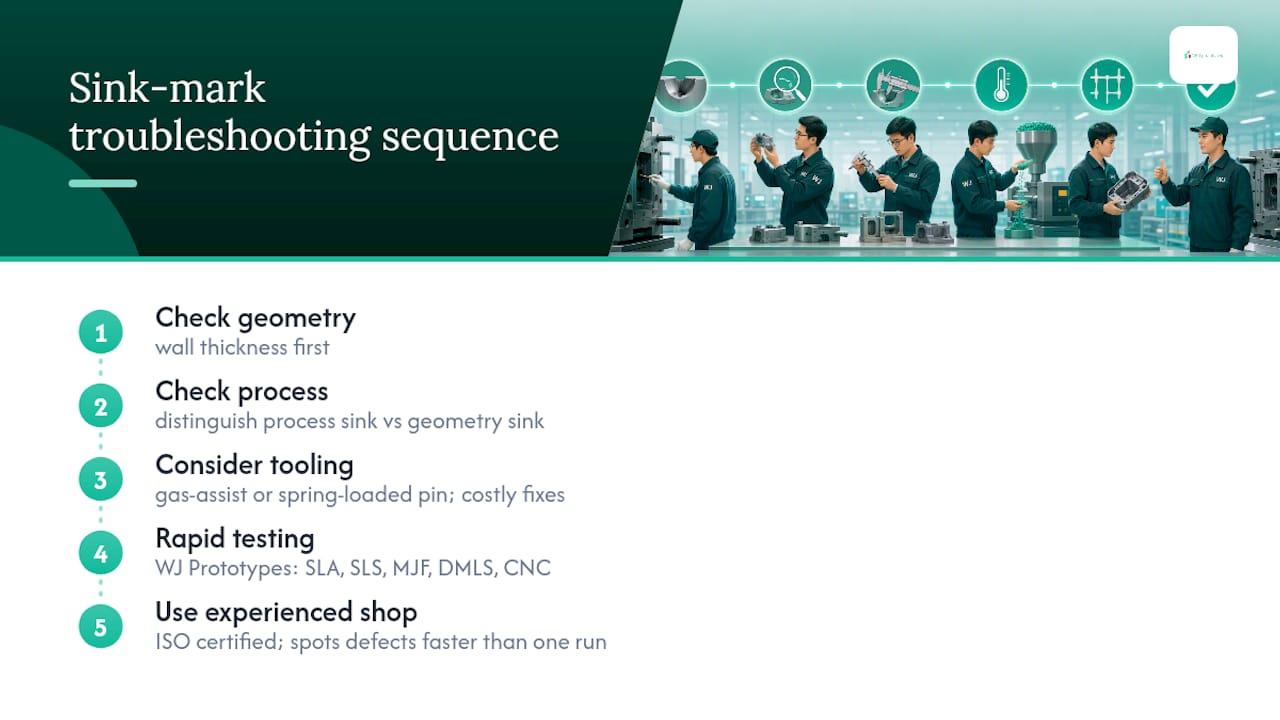
Most sink mark write-ups treat design and process as separate problems, and that’s backwards. The order matters: check geometry, then process, then reach for gas-assist or a spring-loaded pin, because the tooling fixes cost real time and money if the underlying wall thickness was the actual issue all along.
Where this gets genuinely useful is in how fast you can test that sequence. WJ Prototypes runs SLA, SLS, MJF, DMLS, CNC machining, sheet metal fabrication, vacuum casting, injection molding, and die casting for clients across aerospace, automotive, medical, electronics, robotics, oil and gas, and industrial machinery. An ISO certified shop with engineers who see this exact defect across dozens of part geometries a month tends to spot the difference between a geometry sink and a process sink faster than a single in-house trial run ever will.
— Nas
Testing a design change, a new pack profile, or a boss-pin retrofit on your own production line means burning press time you probably can’t spare. WJ Prototypes runs short-run injection molding specifically so you can validate a geometry or process fix on a real tool before committing to full production steel, with no minimum order quantity holding up a small trial batch. Submit your CAD file through the instant online quoting system and you get engineering feedback on wall thickness, gating, and cooling layout alongside your quote, not after tooling is already cut. If you’re still narrowing down whether the fix belongs in the design or the process window, that same quote flow works for a quick prototype run too. Upload your part and get a quote to see what a corrected mold looks like before it ever reaches your production floor.
Sink marks are shallow surface depressions that form when a thick section of a part cools and shrinks slower than the surrounding thin walls, pulling the surface inward. They typically appear opposite ribs, bosses, and thick corners, and the fix depends on whether the root cause is geometry, process settings, or the resin itself.
You generally can’t remove a sink mark from a finished part, but you can eliminate it in future shots by adjusting pack and hold pressure, running a gate-seal test to set correct hold time, or redesigning the offending rib or boss. For parts already in production, a targeted cooling insert or boss-pin retrofit often clears a persistent sink without a full tool rebuild.
Mold lifespan depends heavily on tool steel, cavity count, and production volume, and it isn’t something this article’s sources quantify. A well-maintained hardened steel tool used for medium production runs typically outlasts several soft-tool prototype builds, which is one reason validating a design on a prototype tool first, through a service like WJ Prototypes’ injection molding, protects the more expensive production mold from avoidable rework.
Yes. Tools like Autodesk Moldflow simulate cooling and shrinkage across a part’s geometry, flagging thick sections likely to sink before any steel is cut. It won’t catch every process-related sink, since some only show up once real machine variables come into play, but it dramatically reduces expensive tooling iterations tied to geometry problems.
SERVICES
RESOURCES